DESIGNED FOR VEHICLE RECOVERY
Built for
recovery work.
Vehicle details, approach routes and recovery notes—kept with the job, from the first breakdown report to the final handover.

THE RECOVERY ESSENTIALS
Know the vehicle.
Understand the callout.
Breakdown, flat tyre, battery or accident: the operator needs the registration, vehicle location, safety status and access notes before accepting the job. Select an issue to see what the customer can report.
Describe the problem and where the vehicle is stopped. The operator receives your vehicle details, pickup and notes.
See it in the app ↗Select a flat tyre and add which wheel is affected, along with any useful access information.
See it in the app ↗Choose battery assistance and tell the operator what happened. This demo does not guarantee equipment or availability.
See it in the app ↗Report the issue and whether you are safely stopped. This is not an emergency service and the demo does not dispatch help.
See it in the app ↗Explain the support you need in your own words so the operator can review the request before accepting.
See it in the app ↗
INSIDE THE RECOVERY APP
The customer’s request.
The operator’s workflow.
Follow the working app from both sides: the customer reports the fault and pickup; the operator reviews the callout, follows the approach route and records the recovery handover.
Report the vehicle. Follow the recovery.
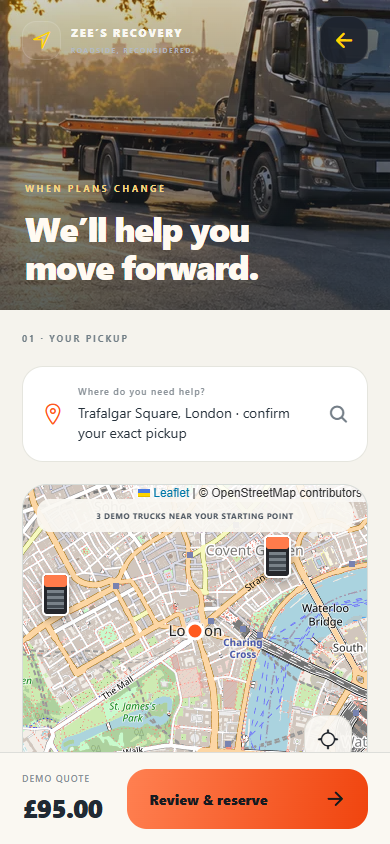
Pinpoint the vehicle.
Tell the recovery operator where your vehicle is, not just where the street begins. Choose an address, then fine-tune the pickup on the map.
- Search your pickup
Enter a street, town or postcode and select an address result.
- Place the pin
Move the map and tap your vehicle’s exact position. The current-location button helps you find your starting point.
- See the approach
Nearby truck icons are demo vehicles. Approach estimates use road routing, with distance in miles—not live traffic.
 PRIVATE ACCESS / TESTFLIGHT
TAKE A CLOSER LOOK
Put the workflow
to the test.
Want to see how this could work for your recovery business? Request a TestFlight invitation and try the customer booking and operator workflow on your iPhone. This trial uses demo callouts and simulated payments; it does not dispatch a truck.
- Request accessShare your name and email.
- Receive your invitationI’ll review your request and email a TestFlight invitation when a build is available.
- Explore the experienceInstall Apple TestFlight on your iPhone, accept the invitation and try the demo.
Invitation-only trial · iPhone via TestFlight · Access subject to build availability. Demo testing is not a live service booking. Your details are used to respond to this request. Privacy policy
BEFORE YOU BEGIN
Before you test
the recovery app.
What the app records, what the operator sees and how the TestFlight trial works.
Who is this recovery platform for?
It is a customer and operator app concept for recovery businesses that want clearer callout information and one connected job workflow. The current build is a trial, not a live roadside dispatch service.
How can I test it with my recovery business?
Request a private demo below. When a build is available, I can send an Apple TestFlight invitation so you can try the customer request and operator workflow on an iPhone.
What details can a customer send before a callout?
The request captures the vehicle make, model, registration, exact pickup, reported problem, safety status and access notes. A missing make or model can be entered manually.
Can the customer choose the exact vehicle location?
Yes. Search for an address, then refine the pickup on the map. The operator receives that selected position with a road approach route and distance in miles.
What can the operator review before accepting?
The offer shows the pickup, vehicle information, reported issue, safety status, customer notes, approach estimate and demo quote. After acceptance, the job drawer keeps those details and operator notes beside the map.
How are arrival and completion recorded?
In GPS mode, a recent accurate fix near the pickup can confirm arrival. A swipe fallback is available when location is unavailable or unreliable. Starting and finishing the recovery are separate actions, and notes can be saved with the job.
Does the trial take payment or dispatch a truck?
No. The trial uses simulated payments and demonstration requests. Nearby truck icons are demo vehicles. Cross-device dispatch, live payments and remote notifications require production integration and testing.
Can it use my company branding and recovery workflow?
We can agree your branding, request fields and operating workflow before development. Equipment suitability, service coverage, pricing and recovery terms must be defined by your business rather than assumed by the app.
What if a vehicle is in an unsafe location?
The customer can flag the location as unsafe so it is visible on the request. The app does not replace emergency assistance and the demo does not send help. Your business must define appropriate safety procedures before launch.